![Dr. Plano_Logo_mono.svg]](https://help.dr-plano.com/hubfs/Dr.%20Plano_Logo_mono.svg)
Customize the payment page
Discussed pages in this section: Booking system settings > Basic data
Online payment transactions place specific requirements on the security of websites (PCI DSS). To ensure that these requirements are fully complied with and, therefore, you have almost no effort, payment of bookings always takes place on a page hosted by Dr. Plano. All bookers are automatically redirected to this payment page to complete their booking. You can customize the payment page to match your corporate identity to offer the most seamless booking and payment experience possible. To do so, upload your logo and a cover image here
Set up online payment per offer
At Dr. Plano, you can set which payment methods are available for each bookable activity separately. To add online payment to the payment methods of an activity, proceed as follows:
- Open the »booking settings« for the relevant activity.
- Scroll to the »fees and payment methods« section. Click on it to edit the fields.
- Hit the »add payment method« button.
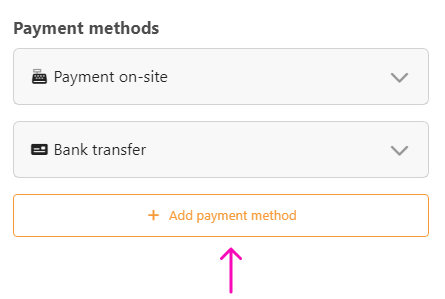
- Choose the type »online payment«.
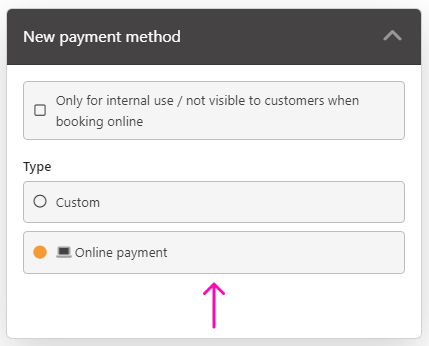
If you cannot select the »online payment« option here, online payment has not yet been activated for your Dr. Plano account. Read here what you need to do.
You can just repeat this procedure for all your bookable activities for which you would like to benefit from the advantages of online payment. As soon as you have saved the changes, online payment will be available in the booking process on your homepage, and your customers can pay directly online when booking 🎉
Adjust existing payment methods
Suppose you had previously set up other payment methods because you already used the booking system without online payment. In that case, you can check directly whether and for what purpose you will need these payment methods in the future. If necessary, you can delete them entirely or restrict them to internal use if online payment should be the only option in the booking process.
.png?width=419&height=448&name=set%20up%20online%20payment%20as%20payment%20method_3%20(1).png)